Ask your company's data on WhatsApp.
We connect Omnis to the systems your company already uses, and you have all your data in the palm of your hand. Just ask on WhatsApp: the answer comes with the number, the source and the period the data covers.

Real conversation, sample data.
The question comes up in the hallway, not in front of the dashboard.
It comes up in a meeting, on a site visit, on the way somewhere. Today it turns into a request to the data team and an answer days later. On WhatsApp the answer arrives right away, with the same care as the web.
Where your team already is
No app to install, no new password to remember. It is the app everyone already opens all day long.
An answer with a source, not an opinion
Every number comes with the definition your company uses and the period the data covers.
The same governance as the web
Each person only sees what their profile allows. Personal data masked by default. And a receipt for every access.
Three steps, done only once.
Your phone has no way to prove it is you. Pairing builds that bridge, and after that you just talk.
Generate a code in Omnis.
In Settings, click Pair my WhatsApp. The code is valid for 10 minutes and works only once.
Send the code to Omnis.
On WhatsApp, to the Omnis number. Your number gets linked to your account and your access profile.
••••-••••
09:06Done: this number is linked to your Data Omnis account.
09:06Ask.
Like any other conversation. To start a topic from scratch, send "new conversation".
How is this quarter's margin by channel?
09:09The same governance as the web, on your phone.
Before it reaches your WhatsApp, the answer goes through the same governance layer as the web.
- ✓
Unbacked statements are removed.
If a statement isn't supported by the data read for that question, governance removes it and says so.
"Removed by governance: 1 statement not backed by the data read in this turn." - ✓
The period is made explicit.
If the data covers only part of the period asked, the answer says from when to when, instead of pretending it covers everything.
- ✓
Outside the limit, it doesn't even read.
One department's agent doesn't read another department's data. When a question crosses the limit, the answer says it wasn't verified and why.
- ✓
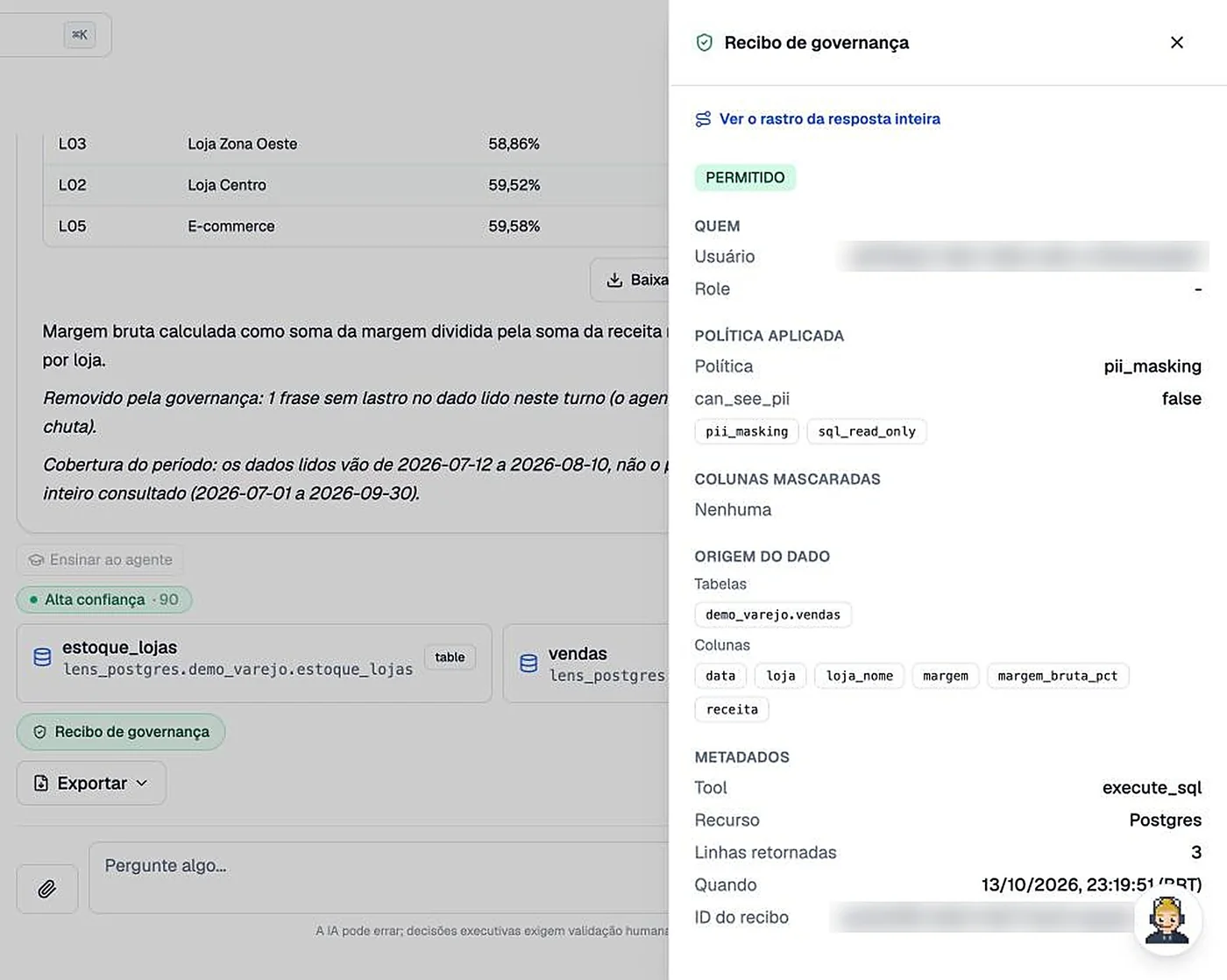
A receipt for every access.
Who asked, which policy applied, which tables and columns were read, how many rows came back and when.
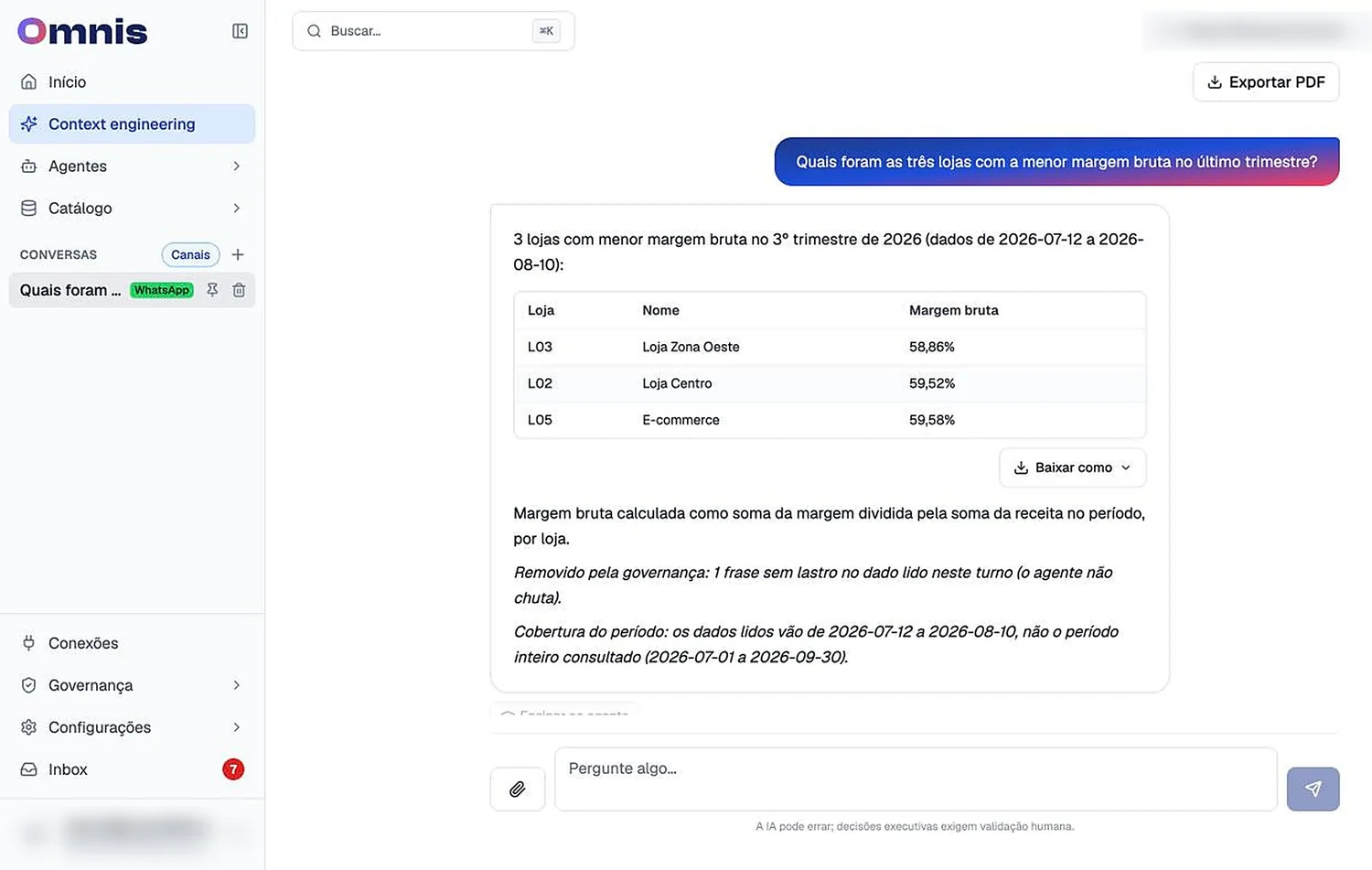
The WhatsApp conversation also lives in Omnis.
Every conversation shows up in the list with the channel tag. You can open it on the web, see the full table, download it as PDF or spreadsheet and audit it later.
- ✓
Starts on the phone, continues on the computer.
The question asked on the go becomes the analysis for the meeting, no copy and paste.
- ✓
Revoke in one click.
New phone, or left the company? The pairing is revoked in Omnis and the number stops receiving data.
The questions that today become emails to the data team.
Examples. What you can ask depends on the systems you connect to Omnis.
What people ask first.
Do I need to install an app?
No. It is the WhatsApp you already use. You pair your number once, through Omnis.
Can anyone who messages it see the data?
No. Only a number paired with an Omnis user gets answers with data, and each person only sees what their profile allows.
What if I change or lose my phone?
You revoke the pairing in Omnis with one click and pair the new number with a new code.
Which data does it answer from?
From the systems your company connects to Omnis: ERP, databases, spreadsheets and documents.
Does it work on Microsoft Teams?
Yes. On Teams access is through the corporate account, no code, with the same governance and the same receipt.
Can I see later what was asked?
Yes. Every conversation stays in Omnis with the channel tag, and every access has its receipt.
Bring Omnis to your company's WhatsApp.
We show the agent answering on WhatsApp, live, and talk about which systems to connect first.
What you see in the conversation
- ✓A question answered on the phone, with source and receipt.
- ✓A question outside the limit being refused, live.
- ✓Which systems make sense to connect first in your case.
Contact us
We get back to you within 1 business day with a few times for you to pick.